
ProTrack4
Plan ambitious software without sprint ceremonies or cloud lock-in. Organize nested features, shared tasks, and real dependencies in a fast, local-first desktop app you own completely.
Overview
ProTrack4 is a calm, fast, local-first desktop project manager for solo builders, engineers, and technical leads. Your entire planning workspace lives in a single portable .protrack file on your computer—no cloud accounts, no login walls, and no remote servers.
Why ProTrack4?
Most project tools force an awkward compromise: flat to-do lists lose structure as soon as a product grows, while team sprint boards bury individual builders under ceremonies and rigid cycles. ProTrack4 is built around how builders actually plan—breaking large ideas down into nested Features as clarity emerges, capturing tasks that may belong to one Feature, multiple Features, or an Unallocated inbox, and tracking real readiness through Feature dependencies rather than arbitrary sprint dates.
Key Features
Nested Features & Accurate Progress
- Recursive Hierarchy: Break products, architectures, or milestones down into nested Features as deeply as you need.
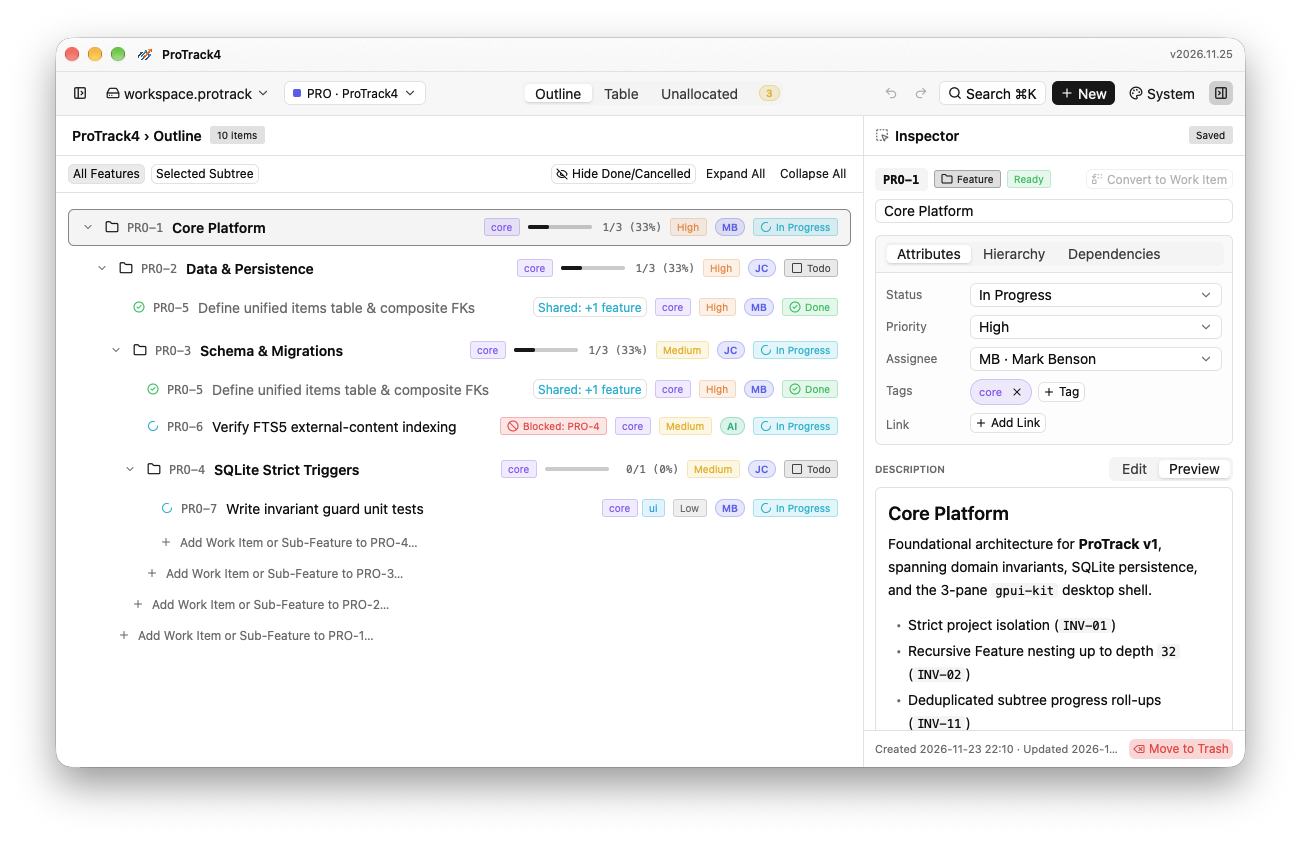
- Deduplicated Progress Roll-Ups: Every Feature shows its live completion percentage across all nested Work Items. If a shared Work Item belongs to multiple sibling sub-features under the same parent, it is counted only once so progress never inflates.
- Explicit Feature Completion: Features and Work Items share five statuses (
Backlog,Todo,In Progress,Done,Cancelled). Finishing child tasks never auto-closes a Feature—you decide when a Feature is ready and ships.
Multi-Feature Work Items & Unallocated Triage
- Shared Across Features: Attach any Work Item to zero, one, or multiple Features within a Project. Each Feature keeps its own task order while status, priority, assignee, tags, and Markdown notes stay in sync in one place.
- Unallocated Inbox: Work Items not yet assigned to a Feature automatically land in a pinned Unallocated bucket with a live counter badge, so you can capture ideas quickly without being forced to categorize them upfront.
- Lossless Feature ↔ Work Item Conversion: Plans evolve—promote an Unallocated or single-parent Work Item into a full Feature, or simplify a leaf Feature back down to a Work Item, while keeping its key (like
PRO-12), title, notes, status, priority, assignee, tags, and blockers intact.
Feature-Level Dependency Blocking
- Readiness Over Dates: Mark any Feature or Work Item as blocked by one or more Features in the same Project, with automatic cycle prevention so dependency loops can’t happen.
- Clear Blocking States: Blocking propagates down Feature subtrees and distinguishes between Directly Blocked, Inherited Blocked, and Partially Blocked (when a shared Work Item still has an unblocked path).
- Soft Visual Warnings: Blocked items display clear badges and gentle warnings if moved to
In Progress, without ever locking you out of updating status.
Built for Everyday Desktop Flow
- 3-Pane Layout & Themes: Work across a collapsible Left Sidebar (workspace and project switchers, Unallocated inbox, nested Feature tree, Trash, Assignees, Tags, and Settings), Main Workspace Views, and a Right Inspector Drawer (
Cmd+I/Ctrl+I) with Light, Dark, and System themes. - Three Focused Views:
- Hierarchical Outline (
Cmd+1/Ctrl+1): Browse nested Features and Work Items with progress bars, blocker badges, shared-item indicators, and inline child creation. - Filtered Table (
Cmd+2/Ctrl+2): Scan a flat, deduplicated list across your Project or selected Feature with sortable columns and filters for kind, status, priority, assignee, tags, and readiness (All, Ready to Work, Blocked Only, Blocker Warnings). - Unallocated Triage (
Cmd+3/Ctrl+3): Rapidly capture tasks (Enterkeeps focus in the quick-capture bar) and drag or assign them into Features in seconds.
- Hierarchical Outline (
- Keyboard-First & Drag-and-Drop: Use
Cmd+K/Ctrl+Kfor instant search and commands,Cmd+N/Ctrl+Nfor contextual quick-add, andCmd+Z/Cmd+Shift+Z(Ctrl+Z/Ctrl+Shift+Z) for full session Undo/Redo. Reorder items, reparent Features, drop Unallocated tasks onto Features, or holdOption/Altwhile dragging a Work Item to attach it to an additional Feature. - Safe Trash & Restore: Trashing a Feature groups it with its sub-features and exclusively owned Work Items for easy one-click recovery, while protecting shared Work Items still used by other active Features.
Portable Workspaces & Local Collaboration
- Single-File
.protrackWorkspaces: Create, open, and switch between workspace files anywhere on disk—including iCloud Drive, Dropbox, or Google Drive—so your plans can live right alongside your documents. - Isolated Projects & Lightweight Assignees: Keep multiple Projects (
PRO,HOME2, etc.) with independent key sequences and project-scoped tags in one workspace, and track work across yourself, collaborators, contractors, or AI agents without creating user accounts.